Welcome to the questions-and-answers listing page for the Microsoft Certified: Azure Fundamentals - (AZ-900) exam. Here, you will find a comprehensive collection of real practice questions, totaling 4,358. This resource is designed to help you familiarize yourself with the types of questions you may encounter on the actual exam, providing an effective way to assess your understanding of Azure fundamentals.
To make the most of this resource, navigate through the different categories of questions. You can start by answering a selection of questions to test your knowledge and identify areas where you may need to focus your studies. Feel free to revisit questions multiple times or discuss them with peers to deepen your understanding. The key to success is not just memorizing answers but comprehending the concepts behind them.
As you prepare for the AZ-900 exam, consider the following study tips:
1. Create a Study Schedule: Allocate specific times each week for studying. Break your material down into manageable sections, allowing time for review and practice questions.
2. Utilize Multiple Learning Resources: In addition to practicing questions, incorporate video tutorials, official Microsoft documentation, and online courses to gain a well-rounded understanding of Azure fundamentals.
3. Engage in Hands-On Practice: Familiarize yourself with the Azure portal and services. Practical experience can solidify your theoretical knowledge and give you the confidence needed for the exam.
By approaching your study systematically and using a variety of resources, you can enhance your chances of success with the Microsoft Certified: Azure Fundamentals - (AZ-900) exam.
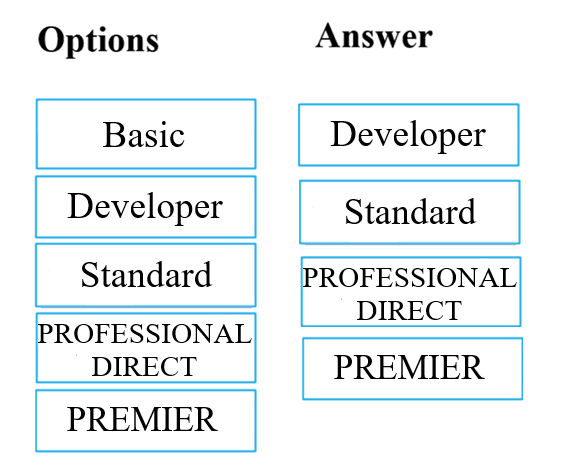
Your IT department is evaluating Azure support plans to ensure they can effectively troubleshoot issues with their cloud infrastructure. The support plan must allow for new support requests to be opened. Which of the following are support plans that will allow this? Answer by dragging the correct option from the list to the answer area. Select and Place:

The discussion clarifies that among the listed support plans, Basic does not allow opening new support tickets. All other options (Developer, Standard, and Professional Direct) enable opening new support requests.
Your company's disaster recovery plan requires data to be accessible even if a regional Azure outage occurs, with the ability to read data from both primary and secondary locations. You need to recommend an Azure storage redundancy option that meets the following requirements:
Data must be stored on multiple nodes. Data must be stored on nodes in separate geographic locations. Data can be read from the secondary location as well as from the primary location
Which of the following Azure stored redundancy options should you recommend?
The question specifies that data must be readable from both the primary and secondary locations. Geo-redundant storage (GRS) replicates data to a secondary region but is only readable from the secondary region during a failover. Read-access geo-redundant storage (RA-GRS) provides read access to the secondary region at all times, fulfilling the requirement. Although the discussion contains some confusion regarding "Read-only geo-redundant storage" the correct terminology is "Read-access geo-redundant storage". The core concept is that read access to the secondary region is required, which is provided by RA-GRS.
Your startup currently uses the Basic Azure support plan but needs a one-time Azure architecture review from Microsoft while minimizing costs. The current plan doesn't offer this. You suggest upgrading to Professional Direct. Does this solution meet the goal of obtaining the review at the lowest possible cost?
The question emphasizes minimizing expenses. While Professional Direct does offer architectural guidance, it's a much more expensive option. The Standard support plan provides access to architectural guidance and design assessments at a significantly lower cost. Therefore, recommending Professional Direct does not meet the goal of keeping expenses to a minimum. The discussion correctly points out that Standard is the more cost-effective option for this specific need.
Note: The question is included in a number of questions that depicts the identical set-up. However, every question has a distinctive result. Establish if the solution satisfies the requirements. Your team needs to provision virtual machines in Azure to host a new application. You need to make use of the appropriate cloud deployment solution. Solution: You should make use of Software as a Service (SaaS). Does the solution meet the goal?
The scenario requires deploying Azure virtual machines. Virtual machines are a core component of Infrastructure as a Service (IaaS). IaaS provides you with the basic building blocks of computing infrastructure—virtual servers, storage, networks, and operating systems—over the internet. You manage the operating systems, data, and applications. Software as a Service (SaaS), on the other hand, provides ready-to-use applications over the internet. You don't manage the infrastructure, operating systems, or even the application itself (example: Microsoft 365, Salesforce). Since the task is to deploy virtual machines (meaning setting them up and managing them), SaaS is not the appropriate model. Therefore, the solution does not meet the goal.
Note: The question is included in a number of questions that depicts the identical set-up. However, every question has a distinctive result. Establish if the solution satisfies the requirements. Your development team needs to spin up several virtual machines in Azure to host legacy applications. You need to make use of the appropriate cloud deployment solution. Solution: You should make use of Platform as a Service (PaaS). Does the solution meet the goal?
The scenario requires deploying Azure virtual machines. Virtual machines are a fundamental part of Infrastructure as a Service (IaaS). IaaS provides you with direct control over the infrastructure, including the operating systems of the virtual machines. You manage the OS, install software, and configure settings. Platform as a Service (PaaS) provides an environment for developing, testing, and deploying applications without managing the underlying infrastructure. With PaaS, you don't have direct access to the operating system of the servers. You deploy your application code, and the PaaS provider manages the rest. Therefore, PaaS is not suitable for deploying virtual machines, making the solution incorrect.
Note: The question is included in a number of questions that depicts the identical set-up. However, every question has a distinctive result. Establish if the solution satisfies the requirements. Your IT department needs to migrate existing on-premises servers to Azure as virtual machines. You need to make use of the appropriate cloud deployment solution. Solution: You should make use of Infrastructure as a Service (IaaS). Does the solution meet the goal?
The scenario requires deploying Azure virtual machines. Infrastructure as a Service (IaaS) is the correct cloud deployment model for this task. IaaS provides the fundamental building blocks of IT infrastructure—virtual machines, virtual networks, storage, and operating systems—giving you maximum control and flexibility. You manage the operating systems, data, and applications. Since deploying virtual machines is precisely what IaaS is designed for, the solution meets the goal.
"Acme Corp" has 10 web applications developed by their team that need to be hosted on Azure. You need to determine which Azure web tier plan to host these web apps. The web tier plan must meet the following requirements: fi The web apps will use custom domains. fi The web apps each require 10 GB of storage. fi The web apps must each run in dedicated compute instances. fi Load balancing between instances must be included. fi Costs must be minimized. Which web tier plan should you use?
The Standard web tier plan fulfills all the requirements for hosting the web applications: Custom domains: Standard supports custom domains. Storage: Standard offers 50 GB of storage per instance, which is more than the required 10 GB for each web app. Dedicated compute instances: Standard provides dedicated compute instances for each web app. Load balancing: Standard includes built-in load balancing to distribute traffic across instances. Cost minimization: Standard is a cost-effective option compared to higher tiers while meeting all the necessary requirements.
Note: The question is included in a number of questions that depicts the identical set-up. However, every question has a distinctive result. Establish if the solution satisfies the requirements. Your company is migrating its IT infrastructure to Azure. Each department will have an administrator responsible for managing the Azure resources they utilize. You aim to ensure the Azure deployment allows for departmental resource segregation while minimizing administrative overhead. Solution: You plan to implement multiple Azure Active Directory (Azure AD) directories. Does the solution meet the goal?
Using multiple Azure Active Directories (Azure AD) to segment Azure resources for different divisions is not the most efficient solution. Increased Administrative Overhead: Managing multiple Azure AD directories significantly increases administrative complexity. Each directory requires separate management, potentially leading to inconsistencies and inefficiencies. Single Azure AD is More Suitable: A single Azure AD directory, combined with features like: Azure Resource Groups: Provides a logical way to group related Azure resources. Azure Role-Based Access Control (RBAC): Allows for granular control over access to resources within the directory. Azure Management Groups: Enables hierarchical organization of subscriptions and resource groups for easier management. This approach offers better segmentation while maintaining a single, centralized management plane, minimizing administrative effort.
Your team has developed a customer portal web app for the Miami branch. The publicly accessible web app will be used by Miami-based employees to access customer and product information. The web app is currently running in a test environment on your company's servers. You plan to migrate the web app to Azure App Service. Determine the most suitable Azure web tier plan to meet the following requirements: The website will use the miami.weyland.com URL. The website needs to be deployed to two instances for redundancy. SSL support is mandatory. The website requires 12 GB of storage. Minimize costs. Which Azure web tier plan should you choose?
The Standard web tier plan in Azure App Service is the most suitable choice that meets all the specified requirements: Custom Domain: The Standard plan allows you to use custom domains, enabling you to configure the miami.weyland.com URL for the website. Multiple Instances: The Standard plan supports scaling out to multiple instances, fulfilling the requirement of deploying the web app to two instances for redundancy and improved performance. SSL Support: The Standard plan includes SSL support, ensuring secure communication over HTTPS. Storage: The Standard plan offers sufficient storage (50 GB) to accommodate the 12 GB requirement. Cost Minimization: While not the absolute lowest cost option, the Standard plan provides the necessary features and capacity for the given requirements at a reasonable cost. Other Azure App Service plans have limitations that prevent them from meeting all the requirements: Basic: Offers a maximum of 10 GB storage, falling short of the 12 GB requirement. Free/Shared: Limited to 1 GB storage and lack features like custom domains and multiple instances.
Note: The question is included in a number of questions that depicts the identical set-up. However, every question has a distinctive result. Establish if the solution satisfies the requirements. The IT department is migrating all company servers, currently hosted on-premises, to an Azure pay-as-you-go subscription. You are tasked with ensuring the chosen Azure solution aligns with the correct expenditure model. Solution: You recommend using the elastic expenditure model. Does the solution meet the goal?
The solution does not meet the goal. Pay-as-you-go is the Correct Term: The appropriate expenditure model for migrating virtual machines to Azure on a pay-as-you-go subscription is simply "pay-as-you-go" or "consumption-based." This model aligns directly with the pay-as-you-go subscription, where you pay for the resources consumed hourly or per minute. Elasticity is a Feature, Not an Expenditure Model: "Elastic expenditure model" is not a standard term in Azure. Elasticity refers to the ability to dynamically scale resources up or down based on demand. While pay-as-you-go allows for this flexibility, it's a feature of the service, not a distinct expenditure model.
Frequently Asked Questions
How realistic are the practice questions for the AZ-900 exam?
The practice questions are designed to closely resemble the actual AZ-900 exam format and difficulty, helping you to familiarize yourself with the types of questions you will encounter.
How should I use the practice questions to prepare for the AZ-900 exam?
Review the practice questions systematically and focus on understanding the explanations for both correct and incorrect answers to strengthen your grasp of the concepts.
How many practice questions should I complete before taking the AZ-900 exam?
While it's subjective, aiming for at least 200-300 practice questions can provide a solid foundation, but focus on understanding concepts rather than just completing numbers.
Can I track my progress when using the practice questions for AZ-900 preparation?
Yes, many practice platforms offer progress tracking, allowing you to monitor your performance over time and identify areas that need improvement.
What is the best strategy for taking the practice exam questions?
Tackle the questions in timed sessions to simulate the actual exam environment and review your answers thoroughly to understand your mistakes and reinforce learning.