

Microsoft Certified: Power BI Data Analyst Associate - (PL-300) Practice Questions

Preparing for the Microsoft Certified: Power BI Data Analyst Associate (PL-300) exam can be a challenging yet rewarding endeavor. This practice exam is designed to provide candidates with a comprehensive set of 1,036 real practice questions that mirror the actual exam format and content. Engaging with these questions allows you to familiarize yourself with the types of scenarios and problem-solving tasks you will encounter on the certification test.
The practice exam serves as a crucial self-assessment tool, enabling you to identify your strengths and areas for further improvement. By tracking your performance, you can focus your study efforts on specific topics where you require additional practice or review, ultimately enhancing your confidence and readiness for the certification exam. Whether you are new to Power BI or looking to validate your skills, this practice exam is an invaluable resource aimed at ensuring you are thoroughly prepared to meet the challenges of the PL-300 certification.
These are independent practice questions modeled on publicly available objectives; they are not official exam questions and are not endorsed by the certification provider. Explanations are intended to teach the reasoning behind each answer.
Read the exam guide, objectives, prerequisites, and study planWelcome to the comprehensive question-and-answer listing page for the Microsoft Certified: Power BI Data Analyst Associate (PL-300) exam. Here, you will find a collection of 1,036 real practice questions designed to help you prepare effectively for the certification. This resource is meant to assist you in assessing your knowledge, identifying areas for improvement, and familiarizing yourself with the types of questions you may encounter on the exam.
To maximize your study experience, start by reviewing questions in various subject areas, taking note of those you find challenging. You can use these questions to guide your study sessions, focusing on topics where your understanding is weaker. Additionally, consider forming a study group with peers or colleagues. Discussing complex concepts and quizzing each other can enhance retention and deepen understanding.
When preparing for the PL-300 exam, maintain a consistent study schedule, breaking down your material into manageable sections. Aim for balanced preparation that includes hands-on practice with Power BI to reinforce theoretical knowledge.
Tip for passing the exam: Practice using the Power BI software extensively. This hands-on approach will bridge the gap between theoretical knowledge and practical application, ensuring that you not only remember the concepts but also understand how to apply them effectively in real-world scenarios.
Question 1 Single Choice
True or False: Quick Measures in Power BI can be used to create complex DAX calculations for common scenarios like "Running Total" without writing any DAX code.

Question 2 Single Choice
To share a Power BI report with a colleague without granting them editing rights, you should _______.
Question 3 Single Choice
Scenario:
Imagine you're a data analyst working for a library. You have two CSV files: "Books" and "Authors."
The "Books" file contains information about each book, including its title, ISBN, author ID, and genre.
The "Authors" file contains details about each author, including their author ID, name, and nationality.
You want to create a Power BI report that analyzes book data, including author information.
Challenge: You need to combine the data from these two CSV files into a single Power BI dataset with a table named "BookDetails." This table should include the following columns:
Title
ISBN
Author ID
Genre
Author Name
Author Nationality
Solution: How should you combine the "Books" and "Authors" queries in Power Query Editor, and how should you manage the loading of the "Authors" query to achieve this?
Question 4 Multiple Choice
In the development of a Power BI report, you aim to analyze the distribution of integer values by grouping them into defined intervals.
To effectively create a histogram that displays these data distributions across several ranges, which two components must you incorporate?
Question 5 Multiple Choice
When configuring Row-Level Security (RLS) in Power BI, which of the following statements are true? (Select two)
Question 6 Single Choice
Scenario: Imagine you're a BI developer building a sales performance dashboard for a large retail company. You're creating a Power BI data model as in the following picture:
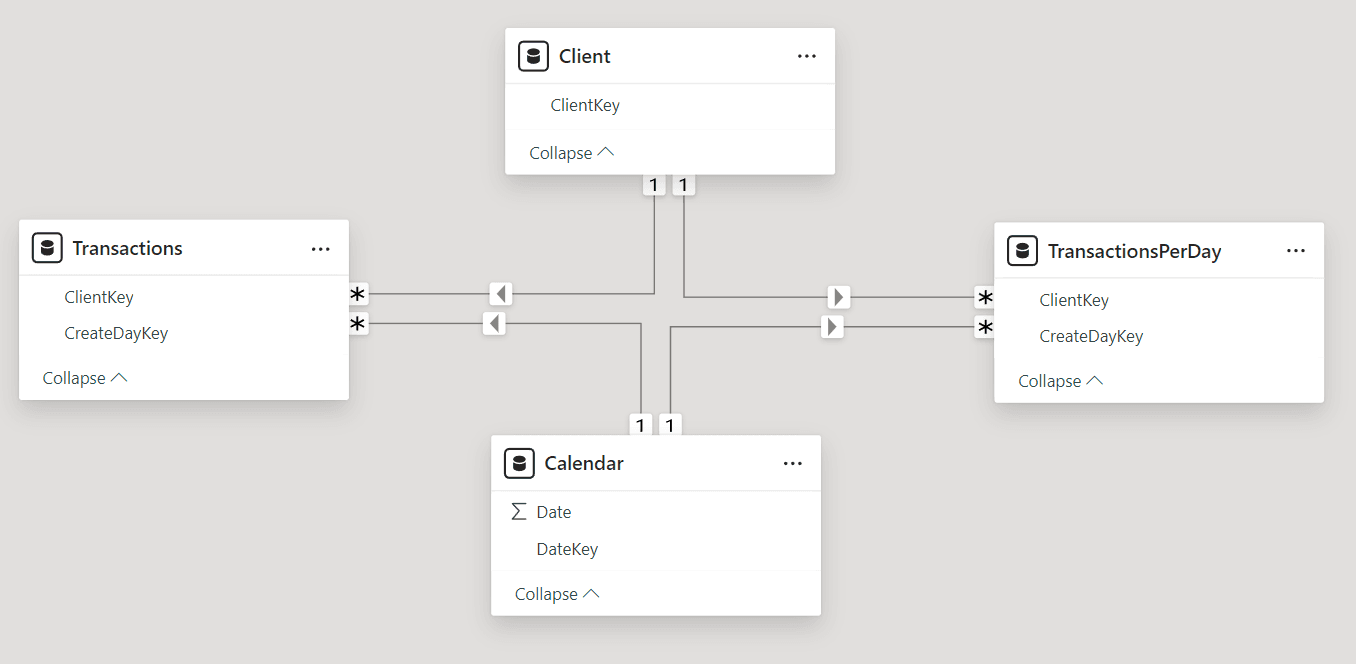
Challenge: You need to choose the most suitable storage mode for each table in your data model, considering the following requirements:
Refresh Frequency: Each table has different refresh requirements, ranging from infrequent updates (Client) to near real-time updates (Transactions).
Visual Performance: You want to minimize the load times of visuals in your reports and dashboards, ensuring a responsive and interactive user experience.
Solution: Which storage mode should you select for each table to meet these requirements?
Question 7 Single Choice
Arrange the following steps in the correct order to use the "Group By" feature in Power Query for creating a summary table that shows the total sales amount per year from a table named "Sales" with columns "SaleDate" and "SaleAmount".
Choose "Sum" as the operation and select the "SaleAmount" column.
Open the "Group By" dialog from the Home tab.
Select "Year" as the column to group by.
Add a custom column to extract the year from "SaleDate".
Question 8 Multiple Choice
A financial institution wants to leverage its historical transaction data to identify fraudulent transactions and improve customer service.
The data is stored across multiple legacy systems and needs to be consolidated, cleaned, and analyzed.
Identify the roles that would be involved in each stage of this process and explain their contributions.
Question 9 Single Choice
True or False: It's possible to apply Row-Level Security (RLS) directly to Power BI dashboards to control user access to specific data within the dashboard.
Question 10 Single Choice
Scenario:
Imagine you're a business analyst working for a manufacturing company.
You're tasked with creating a Power BI report to analyze data from a custom production tracking application that your team built using Microsoft Power Apps.
This application is fully integrated within Microsoft Teams, where your production team uses it to record production data, track orders, and manage inventory.
Question: To build your Power BI report and access the data from this Power Apps production tracking application, which connector should you use in Power BI Desktop?
Frequently Asked Questions
How realistic are the practice questions for the PL-300 exam?
The practice questions for the PL-300 exam are designed to closely mimic the style and content of the actual exam, providing a relevant simulation to help gauge your readiness.
How can I effectively use the practice questions to prepare for the exam?
To prepare effectively, schedule regular practice sessions, review the explanations for each question, and track your progress to identify areas that need more focus.
How many practice questions should I complete before the real exam?
While the exact number can vary by individual, completing at least 70-80% of the 1036 practice questions can help reinforce your understanding and improve your confidence.
Is there a recommended strategy for tackling practice questions?
A good strategy is to start with a mix of topics, then focus on weaker areas; simulate exam conditions by timing yourself, and review explanations to solidify your understanding.
Can I retake practice questions multiple times, and should I?
Yes, retaking practice questions is beneficial; it helps reinforce learning, reveals progress, and deepens your understanding of difficult concepts.